Physical Address
304 North Cardinal St.
Dorchester Center, MA 02124
Physical Address
304 North Cardinal St.
Dorchester Center, MA 02124

Explore practical guides and tools for Microsoft 365, Azure, and PowerShell. Enhance your cloud security and admin skills with expert insights and automation tips.
Explore practical guides and tools for Microsoft 365, Azure, and PowerShell. Enhance your cloud security and admin skills with expert insights and automation tips.

🚨 Important Update : Managing Unlicensed OneDrive Accounts 🚨
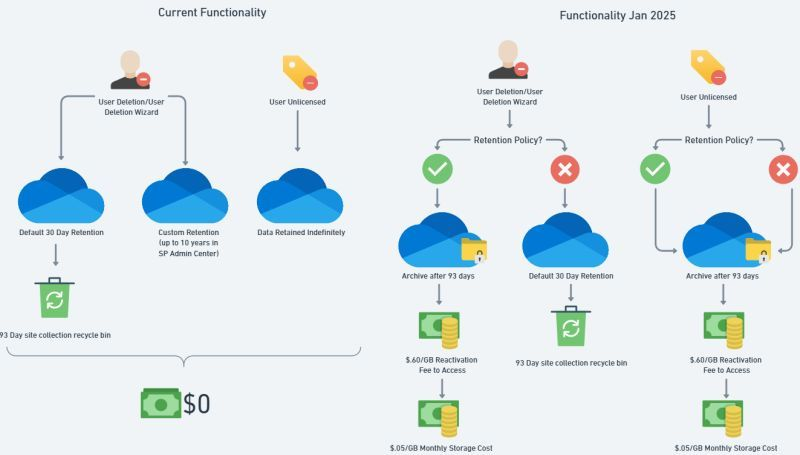
Microsoft is introducing new rules that will impact unlicensed OneDrive accounts in your organization, effective January 27, 2025. These changes aim to improve security and manage file ownership more effectively. Here’s what you need to know:
What Happens After 93 Days of Inactivity ?
1. For Unlicensed Accounts:
• Under Retention Policy or Legal Hold: Accounts will be archived but remain visible to admins.
• Not Under Policy: Accounts will be moved to the Recycle Bin and permanently deleted after 93 days.
How to Identify Unlicensed Accounts ?
You can check unlicensed accounts via the SharePoint Admin Center by navigating to Reports > User Reports, where you’ll find details like user names, emails, account types, and activity status.
How to Manage Unlicensed Accounts:
• Assign a License: Reactivate the account and assign a Microsoft 365 license.
• Delete the Account: If you no longer need it, delete it via the Admin Center or PowerShell.
• Archive the Account: If you do nothing, the account will be archived and incur monthly storage fees.
Cost Considerations:
• Reactivating Archived Accounts: $0.60 per GB.
• Monthly Storage Fees: $0.05 per GB for archived accounts.
Example Cost:
• Reactivating 100 archived accounts with 1 TB of data each will cost $614.40.
• Monthly storage for those 100 TB will cost $5,120.
Key Takeaways:
• Accounts without licenses for 93 days will either be archived or moved to the Recycle Bin.
• Archived accounts incur storage costs, and reactivation involves additional fees.
• Review your unlicensed accounts early to make informed decisions.
It’s time to ensure your organization is prepared for these changes! Let’s stay proactive to manage unlicensed OneDrive accounts efficiently.
Thanks