Physical Address
304 North Cardinal St.
Dorchester Center, MA 02124
Physical Address
304 North Cardinal St.
Dorchester Center, MA 02124

Explore practical guides and tools for Microsoft 365, Azure, and PowerShell. Enhance your cloud security and admin skills with expert insights and automation tips.
Explore practical guides and tools for Microsoft 365, Azure, and PowerShell. Enhance your cloud security and admin skills with expert insights and automation tips.
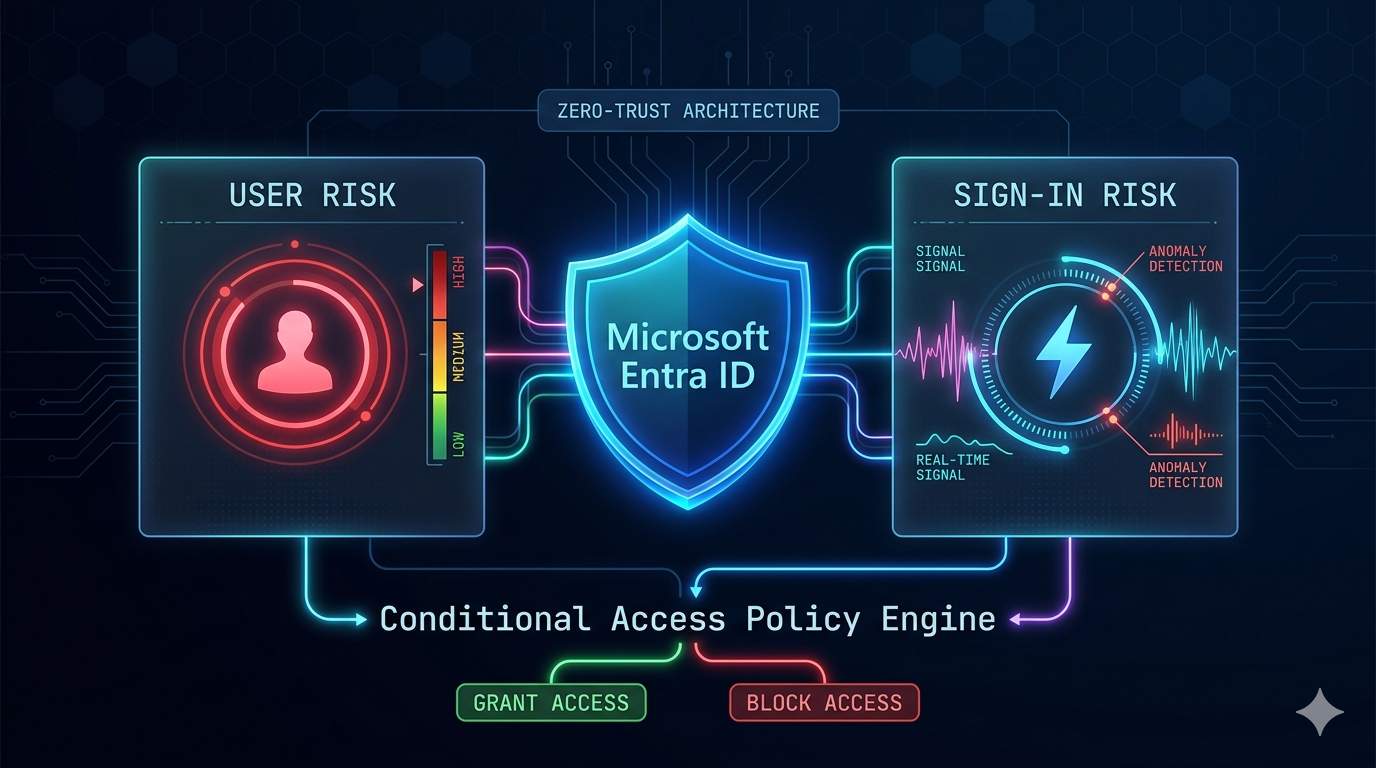
In today’s ever-evolving threat landscape, identity has become the new security perimeter. Attackers no longer need to breach firewalls or exploit network vulnerabilities when they can simply compromise a user’s credentials through phishing, password spraying, or credential stuffing attacks. Microsoft Entra ID Protection, combined with Conditional Access policies, provides organizations with a powerful framework to automatically detect these identity-based threats and require users to remediate risks before gaining access to corporate resources.
This article provides a comprehensive, hands-on guide to understanding and implementing risk remediation policies in Microsoft 365 Conditional Access.
Understanding the distinction between user risk and sign-in risk is fundamental to configuring effective risk remediation policies. These two risk types address different threat scenarios and require different remediation approaches.
User risk :
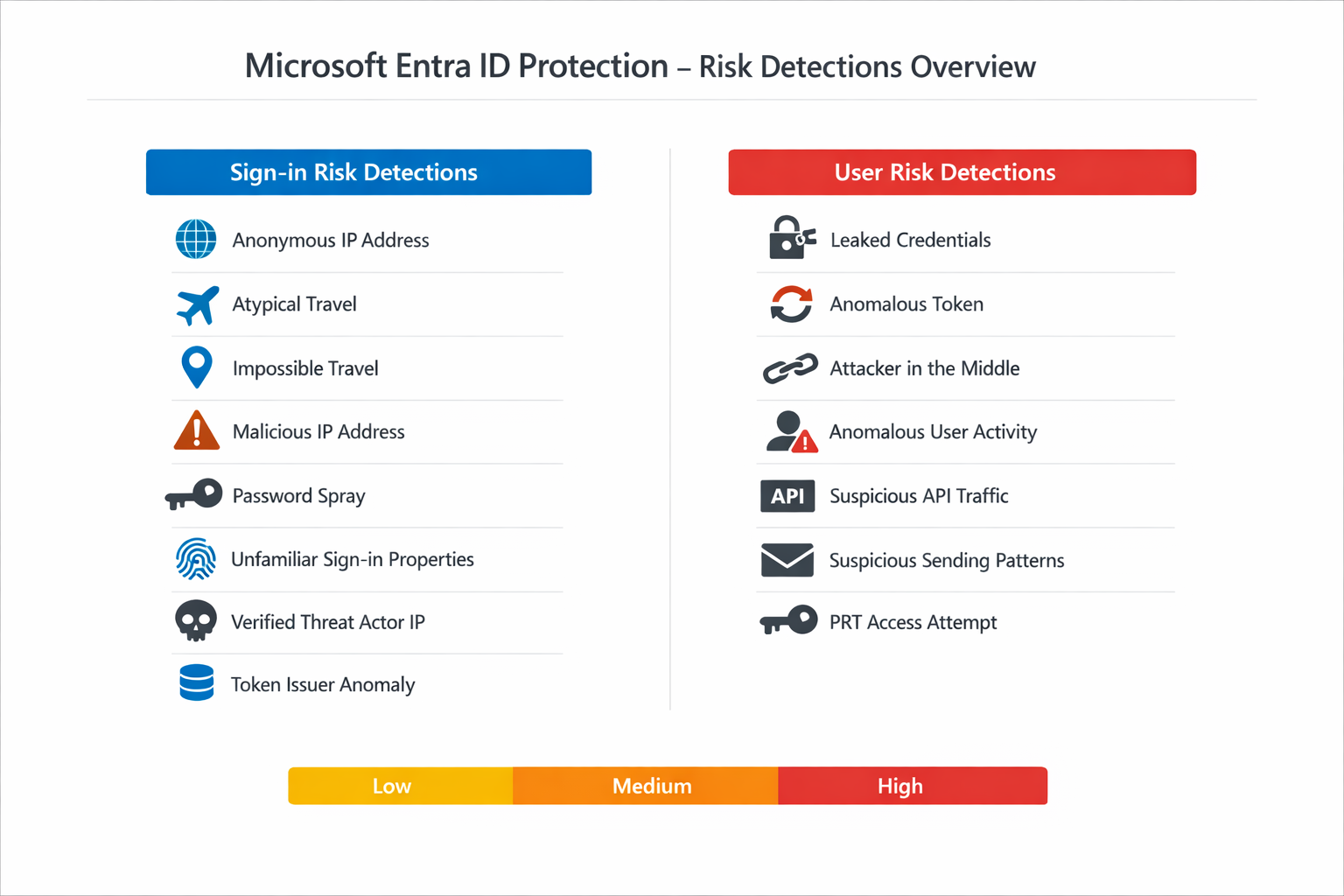
Represents the probability that a given user account has been compromised. This is a persistent risk that stays with the user until it is remediated. For example, if a user’s credentials are found in a leaked credentials database, the user risk level is elevated to “High” and remains there until the user completes a secure password change or an administrator manually dismisses the risk. User risk detections include scenarios like leaked credentials, anomalous user activity, attacker-in-the-middle attacks, suspicious API traffic, and attempts to access the Primary Refresh Token (PRT).
Sign-in risk :
On the other hand, represents the probability that a specific authentication request was not authorized by the identity owner. Sign-in risk is transactional — it applies to a single sign-in session rather than the user account as a whole. Examples include sign-ins from anonymous IP addresses, atypical travel patterns, impossible travel, password spray attacks, and unfamiliar sign-in properties. Once the sign-in session is remediated (typically through MFA), the risk for that specific sign-in is resolved.
| Aspect | User Risk | Sign-in Risk |
|---|---|---|
| Scope | Entire user account | Single sign-in session |
| Persistence | Remains until remediated | Per-session, resolved after remediation |
| Typical Remediation | Secure password change + MFA or session revocation | Complete MFA challenge |
| Examples | Leaked credentials, anomalous token, AiTM attack | Anonymous IP, atypical travel, password spray |
| Recommended Risk Level | Enforce at High | Enforce at Medium + High |
| Grant Control | Require Risk Remediation or Require Password Change | Require MFA (Authentication Strength) |
Never combine sign-in risk and user risk conditions in the same Conditional Access policy. Microsoft explicitly warns against this. Always create separate policies for each risk condition to avoid conflicts and ensure proper remediation flows.
Microsoft Entra ID Protection provides a broad range of risk detections that identify suspicious activity in your organization. These detections are powered by a combination of real-time analysis during the sign-in flow and offline analysis that runs asynchronously. Understanding these detection types helps you appreciate the depth of intelligence behind risk-based policies and enables you to investigate alerts more effectively.
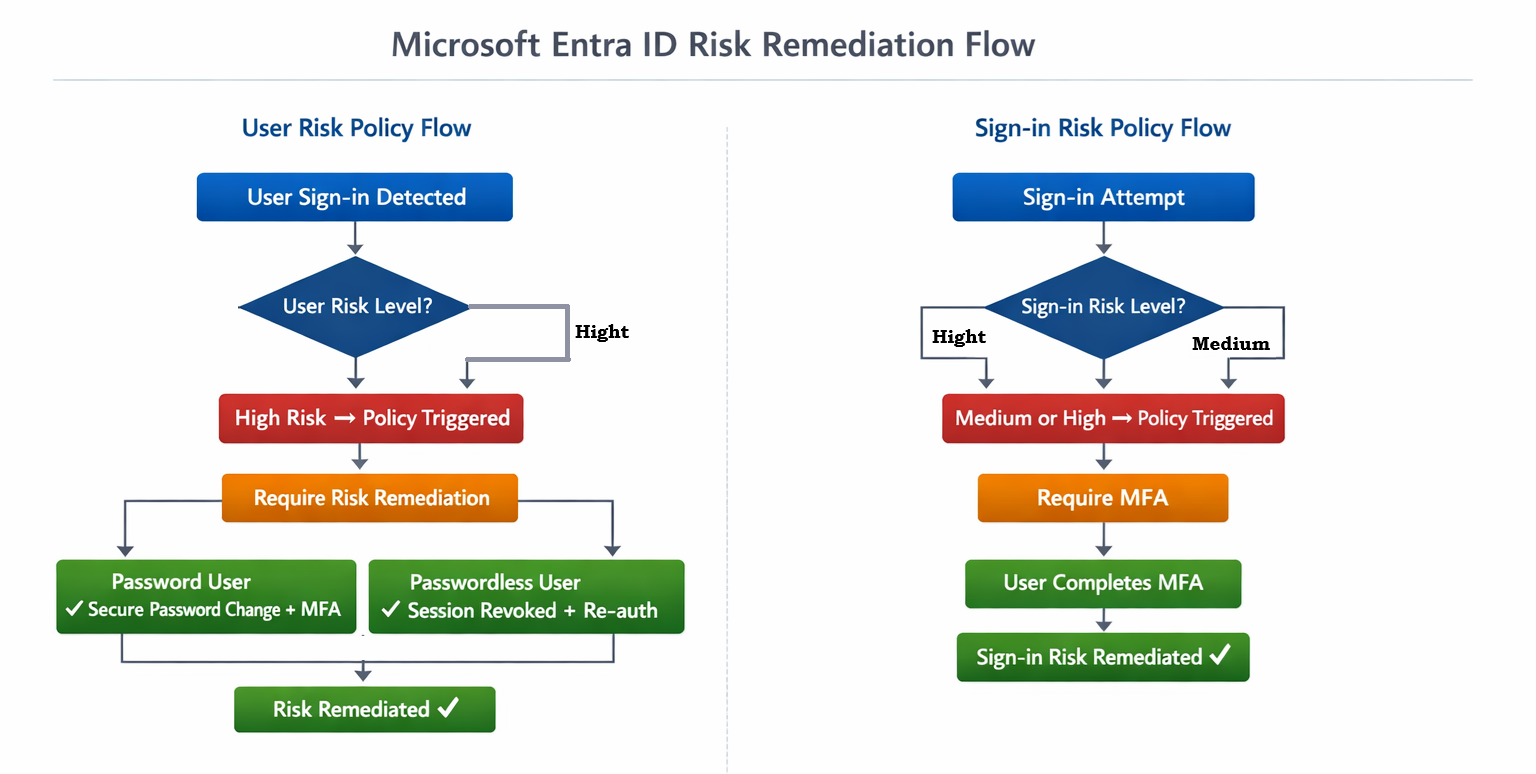
The “Require Risk Remediation” grant control is the newest and most intelligent option available for user risk policies in Conditional Access. Unlike the older “Require Password Change” control, which only addresses password-based scenarios, the “Require Risk Remediation” control uses adaptive remediation that adjusts its behavior based on the specific threat observed and the user’s authentication method.
When this control is triggered, Microsoft Entra ID Protection evaluates the nature of the risk detection and the user’s configured authentication methods, then selects the most appropriate remediation action. This means the same policy can effectively protect both password-based users and passwordless users without requiring separate policies for each group.
Before implementing CA auto-remediation, ensure the following components are licensed, configured, and in scope.
At least two break-glass accounts must exist and be excluded from all Conditional Access policies. These accounts prevent complete lockout in case of policy misconfiguration or service issues.
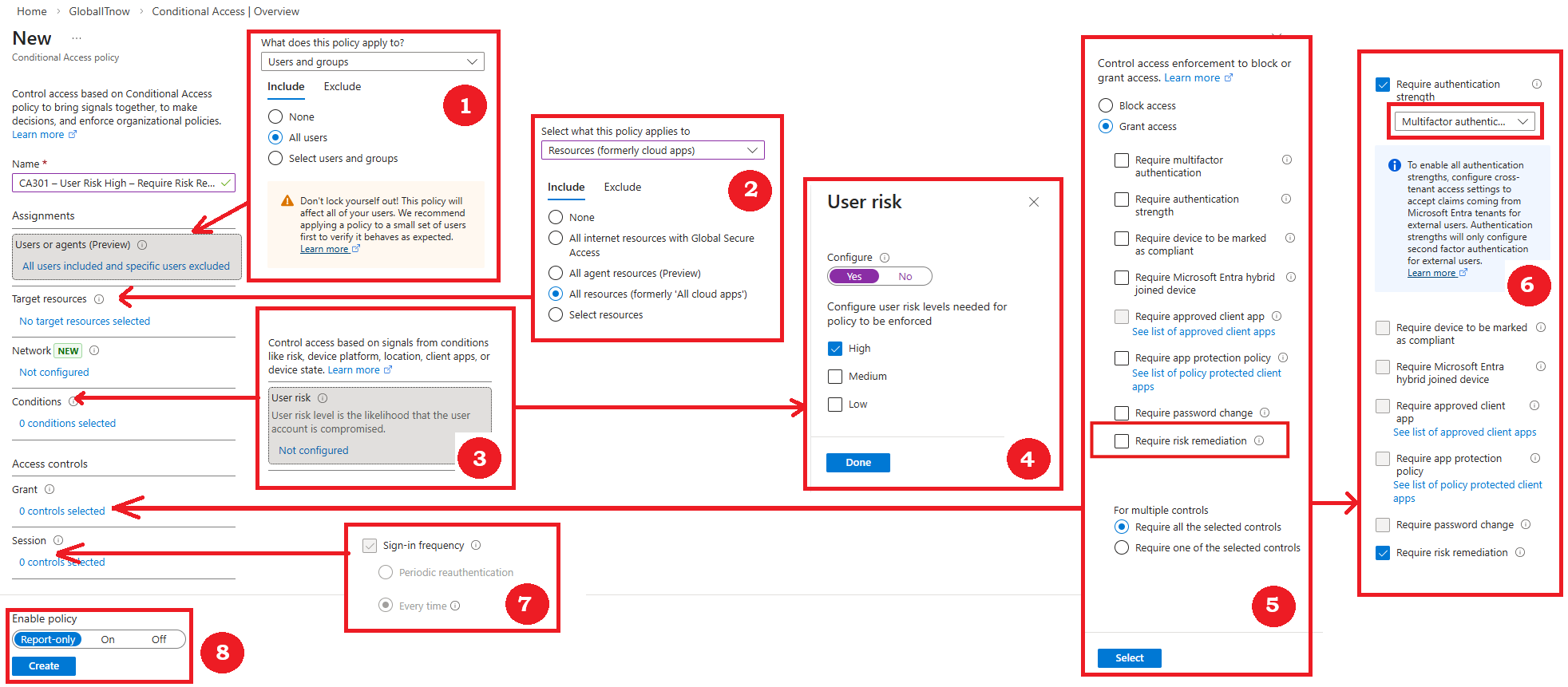
This section walks you through creating a Conditional Access policy that requires risk remediation when a user’s risk level is High. This is the recommended configuration by Microsoft and covers both password-based and passwordless authentication methods through adaptive remediation.
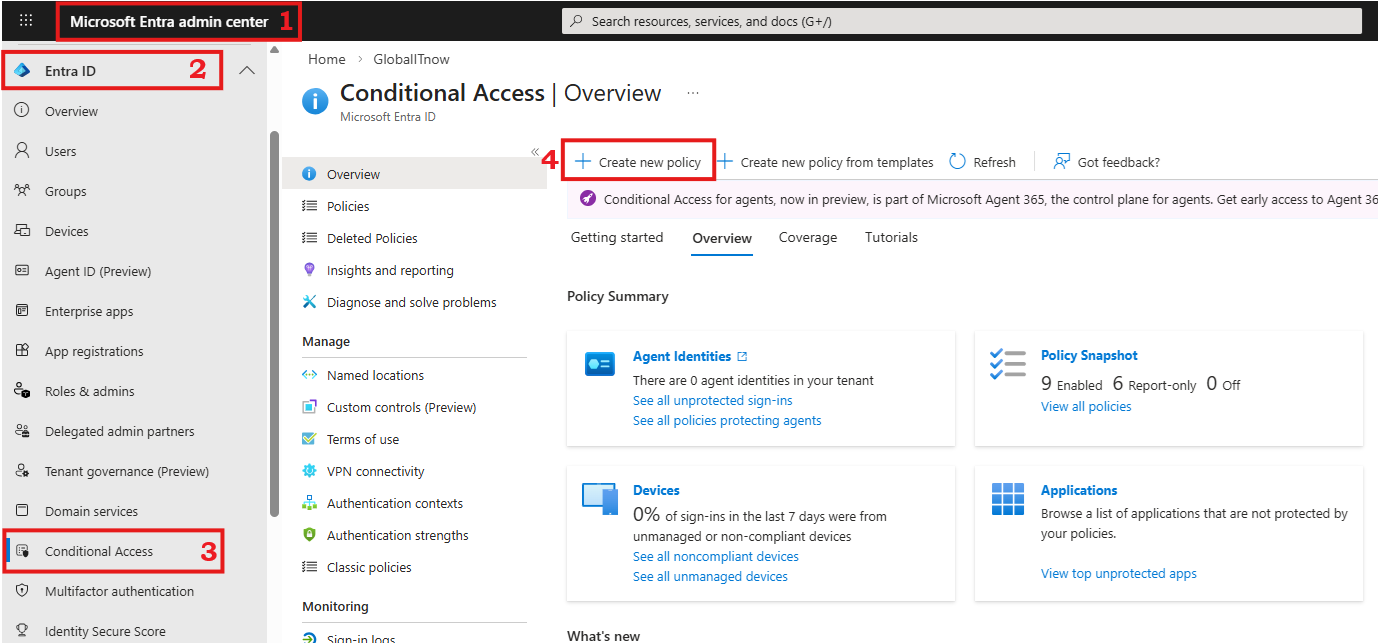
CA-UserRisk-High-RequireRemediation or CA301 – User Risk High – Require Risk Remediation – All UsersMicrosoft recommends enforcing at the High level to minimize false positives. Adjust based on your organization’s risk tolerance.
While the user risk policy addresses persistent account compromise, the sign-in risk policy handles suspicious individual authentication attempts. Microsoft recommends requiring MFA when the sign-in risk is Medium or High.
CA302 -SignInRisk - MediumHigh -RequireMFA – All Users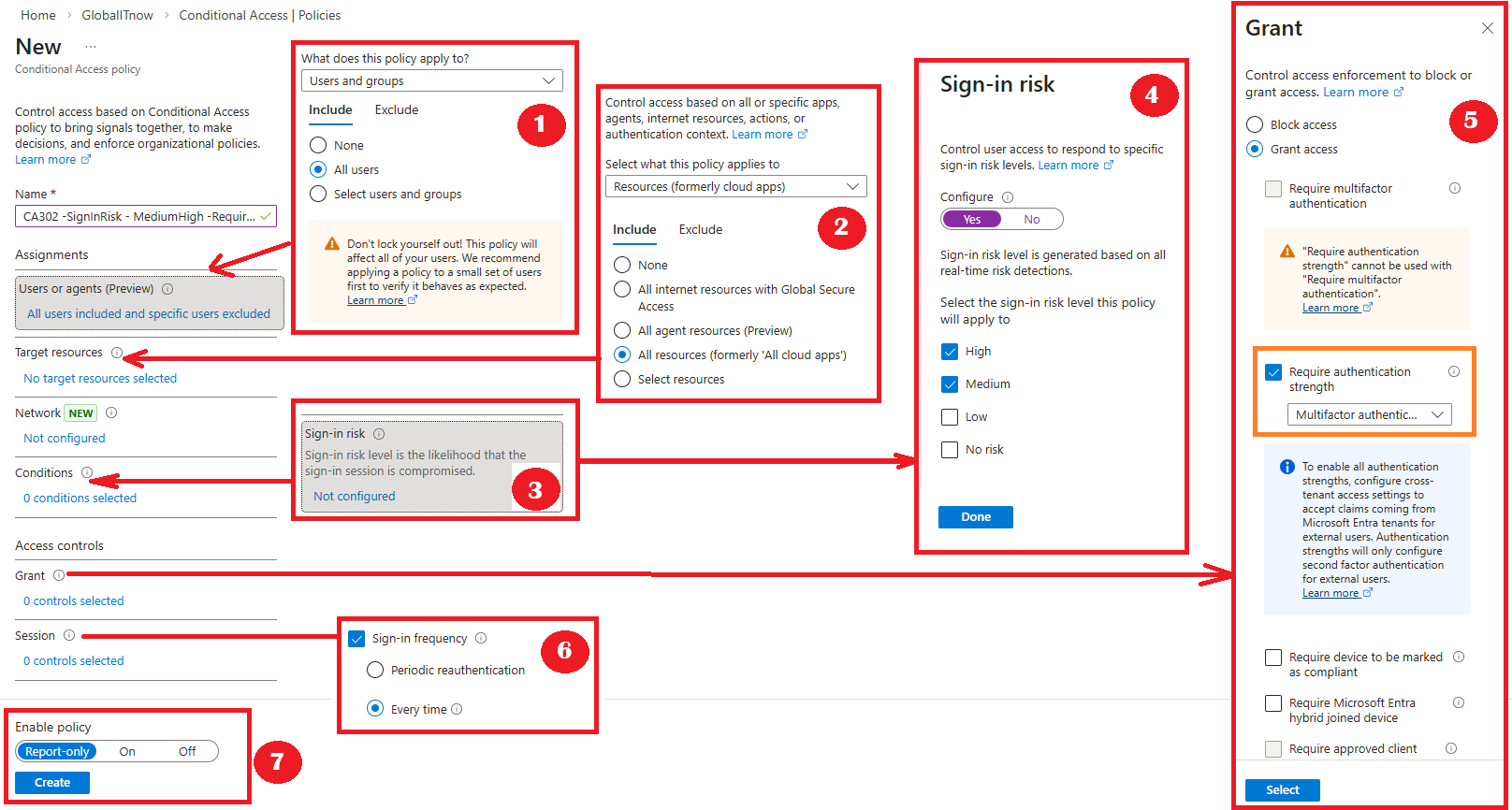
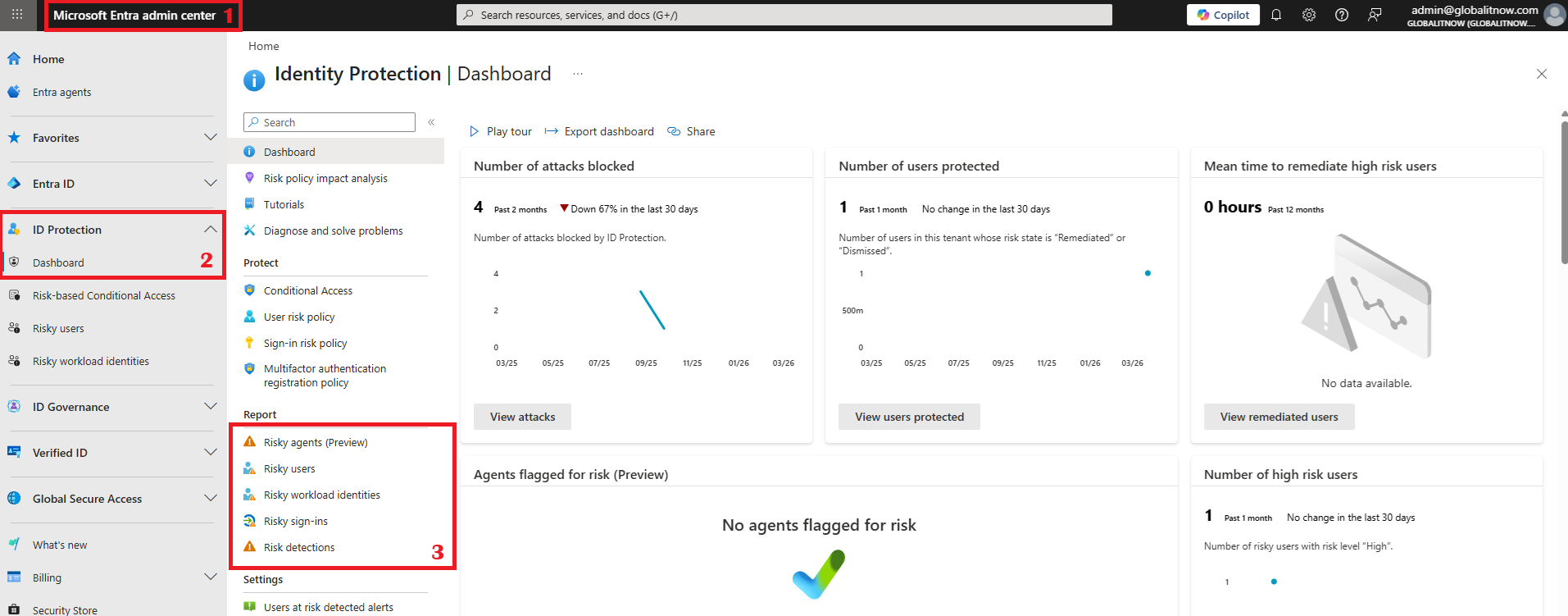
Deploying risk remediation policies is only the beginning. Continuous monitoring and investigation are essential to maintaining an effective identity security posture. Microsoft provides several tools and reports for this purpose.
Thanks