Physical Address
304 North Cardinal St.
Dorchester Center, MA 02124
Physical Address
304 North Cardinal St.
Dorchester Center, MA 02124

Explore practical guides and tools for Microsoft 365, Azure, and PowerShell. Enhance your cloud security and admin skills with expert insights and automation tips.
Explore practical guides and tools for Microsoft 365, Azure, and PowerShell. Enhance your cloud security and admin skills with expert insights and automation tips.
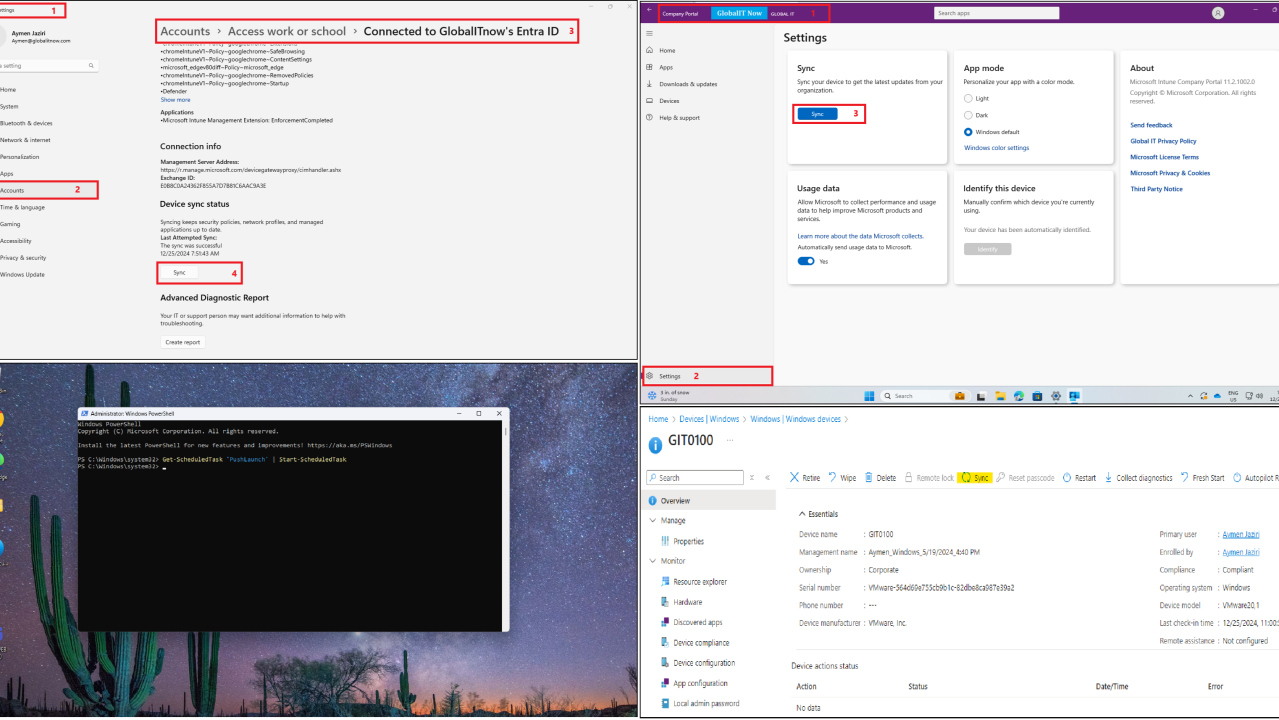

Did you know that Intune’s default synchronization cycle is 8 hours ⏱️ for all devices (Windows, iOS, Android, macOS) ❓
what if you want to test a policy and see the result right now ❓
Are you going to wait for Intune synchronization cycle ❓
Here is 4 Quick solutions to force synchronization :


Get-ScheduledTask 'PushLaunch' | Start-ScheduledTask 

✅ For Win32 applications, remember that the Intune Management Extension has a different synchronization cycle of 1 hour
✅ In my case, I’m using solution 1+4 in the same time 😂.
Thanks