Physical Address
304 North Cardinal St.
Dorchester Center, MA 02124
Physical Address
304 North Cardinal St.
Dorchester Center, MA 02124

Explore practical guides and tools for Microsoft 365, Azure, and PowerShell. Enhance your cloud security and admin skills with expert insights and automation tips.
Explore practical guides and tools for Microsoft 365, Azure, and PowerShell. Enhance your cloud security and admin skills with expert insights and automation tips.
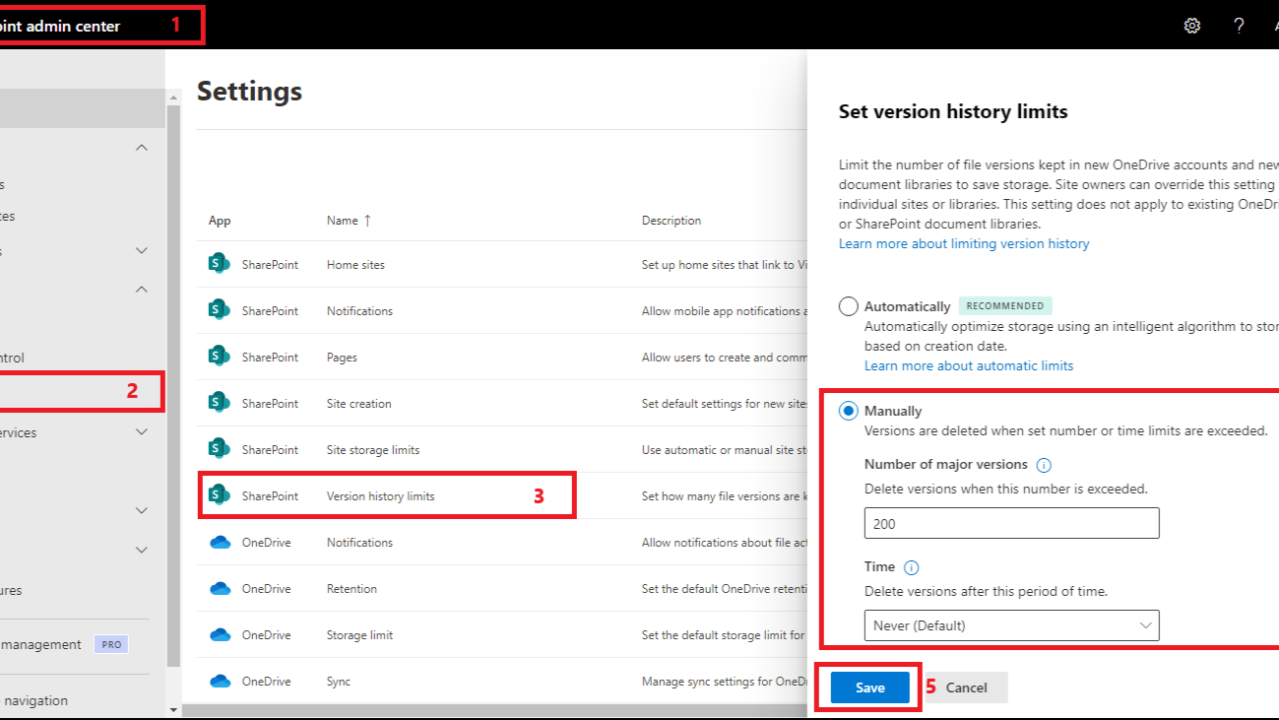

Discover why manually setting “Version History Limits” in SharePoint is crucial for your organization.
📊 Concrete impacts:
✅ Storage optimization
– Each stored version is a complete copy of the file- The default limit of 500 versions can quickly overload your space- Intelligent management frees up space for active data
✅ Precise control
– Define the exact number of major versions (between 100 and 50,000)- Configure a customized retention period (from 30 days to several years)- Tailor parameters to your specific needs per library
✅ Performance and efficiency
– Automatic removal of obsolete versions- Retention of the most relevant versions- Optimized management of frequently modified documents
Pro tip :
Microsoft recommends keeping at least 100 versions to ensure good data protection while optimizing storage space
🔐 Bonus :
This configuration enables you to meet your compliance requirements while maintaining a perfect balance between retention and performance