Physical Address
304 North Cardinal St.
Dorchester Center, MA 02124
Physical Address
304 North Cardinal St.
Dorchester Center, MA 02124

Explore practical guides and tools for Microsoft 365, Azure, and PowerShell. Enhance your cloud security and admin skills with expert insights and automation tips.
Explore practical guides and tools for Microsoft 365, Azure, and PowerShell. Enhance your cloud security and admin skills with expert insights and automation tips.
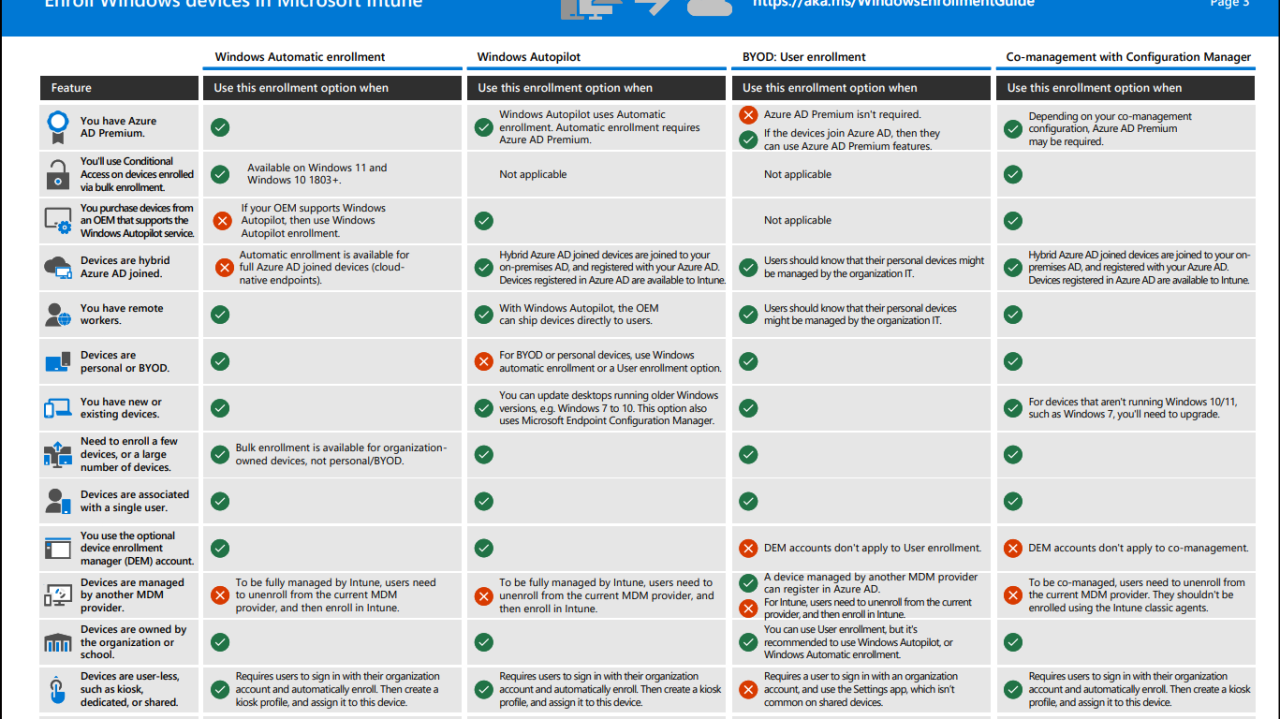

Full document Link : https://download.microsoft.com/download/e/6/2/e6233fdd-a956-4f77-93a5-1aa254ee2917/msft-intune-enrollment-options.pdf
Enrolling devices in Microsoft Intune is a key step in ensuring endpoint management and security in the enterprise. But with several options available, how do you choose the right method ? 🤔
Here’s an overview of the different enrollment methods for Windows machines and their recommended use:
🔹 Ideal for companies using Azure AD Premium and wanting automatic enrollment.
🔹 Compatible with Windows 11 and 10 (1803+).
🔹 Recommended for remote workers and personal or business devices.
🔹 Complete enrolment automation with an out-of-the-box experience.
🔹 Perfect for new devices purchased from a compatible OEM.
🔹 Supports Hybrid Azure AD Join scenarios and remote deployment.
🔹 Enables employees to enroll their personal devices without requiring Azure AD Premium.
🔹 Users must be aware that their personal device may be managed by the organization.
🔹 Less recommended for companies seeking total control over devices.
🔹 Useful for companies still using ConfigMgr (SCCM) and wishing to transition to Intune.
🔹 Sometimes requires Azure AD Premium, depending on the chosen configuration.
which method to choose?
💡 If you want rapid, automated deployment, Autopilot is the best solution.
💡 For smooth integration with ConfigMgr, opt for Co-management.
💡 For BYOD management, User Enrollment offers interesting flexibility.
👉 Which method do you use in your company? Share your experiences in comments!
Thanks