Physical Address
304 North Cardinal St.
Dorchester Center, MA 02124
Physical Address
304 North Cardinal St.
Dorchester Center, MA 02124

Explore practical guides and tools for Microsoft 365, Azure, and PowerShell. Enhance your cloud security and admin skills with expert insights and automation tips.
Explore practical guides and tools for Microsoft 365, Azure, and PowerShell. Enhance your cloud security and admin skills with expert insights and automation tips.
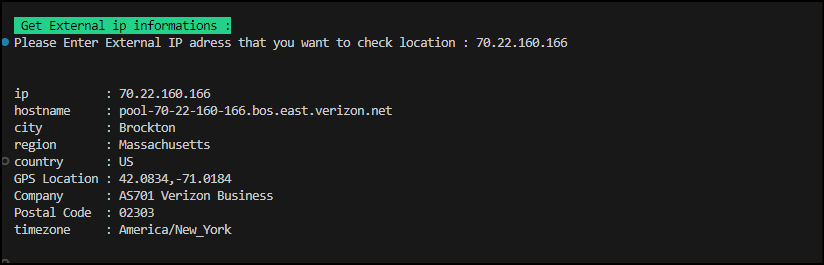

Today, I wanted to share with you a PowerShell script that I’ve found particularly useful. It allows you to obtain detailed information about a specific external IP address.
Here’s the script:
Write-Host `n`n 'Get External ip informations :' -BackgroundColor Green -ForegroundColor Black
            # Get information about public ip adress : location , HostName , city, Region , postal , timezone...
            $ExternalIP = Read-Host("Please Enter External IP adress that you want to check location ")
            Invoke-RestMethod -Uri https://ipinfo.io/$ExternalIP | Select-Object Ip, Hostname, City, Region, Country, @{label = "GPS Location";E={$_.loc}} , @{label ="Company";E={$_.org}}, @{label ="Postal Code";E={$_.postal}} , timezone
This script is ideal for network troubleshooting or for obtaining information on the location of a specific IP address. It uses the ipinfo.io API to retrieve information such as IP address, hostname, city, region, country, GPS location, company, zip code and time zone.
Give it a try and share your feedback!
Thanks





