Physical Address
304 North Cardinal St.
Dorchester Center, MA 02124
Physical Address
304 North Cardinal St.
Dorchester Center, MA 02124

Explore practical guides and tools for Microsoft 365, Azure, and PowerShell. Enhance your cloud security and admin skills with expert insights and automation tips.
Explore practical guides and tools for Microsoft 365, Azure, and PowerShell. Enhance your cloud security and admin skills with expert insights and automation tips.
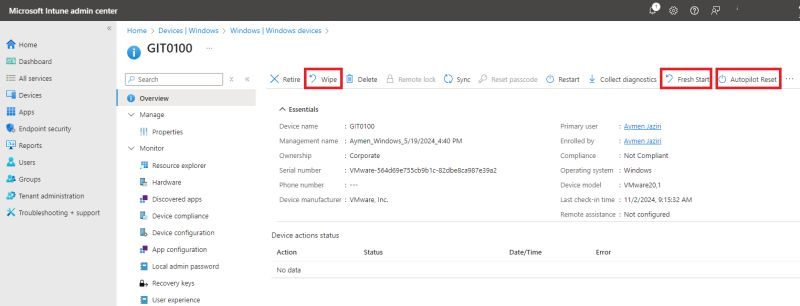

Do you know the differences between the three Microsoft Intune reset methods ?
✅ Wipe :
The wipe performs a complete reset to the device’s factory settings :
– Deletes all personal and corporate data
– Deletes all settings and applications
– Unregisters the device from Azure AD and Intune
– Returns the device to its original state
✅ Fresh Start
Fresh Start reinstalls Windows while preserving certain elements :
– Retains Azure AD and MDM registration
– Removes preinstalled applications (bloatware)
– Preserves user data
– Provides a clean, up-to-date version of Windows
✅ Autopilot Reset
Autopilot Reset is designed to quickly reuse a device within the organization :
– Deletes user files, applications and settings
– Retains connection to Azure AD and Intune
– Maintains regional/language/keyboard settings
– Retains provisioning packages and Wi-Fi connections
– Allows direct reconnection without initial configuration
💡Recommended use cases :
– Wipe : for lost/stolen devices or devices leaving the organization.
– Fresh Start : to refresh a slow or cluttered device while retaining data.
– Autopilot Reset : To quickly reassign a device to a new user in the organization.
Thanks