Physical Address
304 North Cardinal St.
Dorchester Center, MA 02124
Physical Address
304 North Cardinal St.
Dorchester Center, MA 02124

Explore practical guides and tools for Microsoft 365, Azure, and PowerShell. Enhance your cloud security and admin skills with expert insights and automation tips.
Explore practical guides and tools for Microsoft 365, Azure, and PowerShell. Enhance your cloud security and admin skills with expert insights and automation tips.
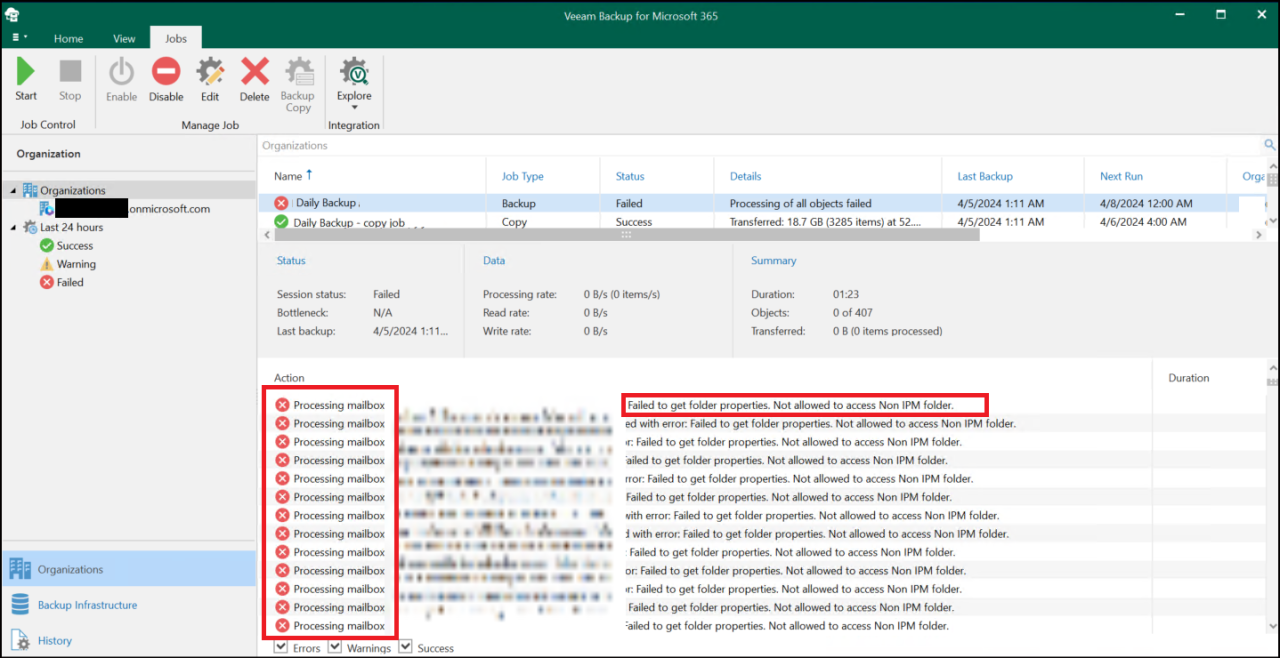

We noticed on April 03, 2024 that Veeam 365 displays a very large number of errors when executing Backups, no backup was performed successfully, I waited another 24H to see if the problem will recur, and well yes the problem repeated on April 04 as well.
Veeam has announced that the problem has occurred for several customers and that they are currently working on a solution.
Here’s the message from Veeam Bacup:
We have started receiving cases relating to the error: - "Processing mailbox failed with error: Failed to get folder properties. Not allowed to access Non IPM folder."
This issue seems to be impacting a large number of M365 tenants.
As we are currently collecting data relating to this issue, we would very much appreciate if you can run a Fiddler trace during the affected backup job run, this is to collect the connection details in relation to requests sent & received from MS.
The issue is caused by the hidden TeamsMessagesData folder that has been used in the past for journaling Teams messages. Until yesterday Microsoft has not blocked access to this folder after the access via EWS APIs was deprecated and the new paid APIs were introduced.
This is the error message displayed for all backups

To fix the problem, simply follow these steps:
1- open the “Config.xml” file in the “‘C:\ProgramData\Veeam\Backup365” directory with Notepad.

2- Add the following line “<Proxy SkipTeamsMessagesDataFolders=”True” />” just before the “</Archiver>” tag.

3- Close Veeam 365 and restart the Veeam services or the Backup server.
4- After restarting the server, run the backup again and check that everything is correct.

Enjoy 365 Backups 😉
Thanks